
Do you want to purchase a sublimation printer but don’t know where to start? Have you been looking for a while and are overwhelmed by the options? Are you in analysis paralysis when it comes to making a choice? It seems like there are SO many complicated options to find the sublimation printer that’s best for you. There really aren’t that many printers — it just seems like it! I hope this article can simplify the options for you.
In order to pick out the perfect printer for you, you’ll need to ask yourself some basic questions. But in order to properly answer them, you probably need to know a little more about what a sublimation printer does and what features are available, because my bet is that you will answer most of them, “uh, I don’t know!”
I’ll ask pose the basic questions first, then explain about sublimation printers, then come back to the questions again. Finally, I’ll get to the information you really want: the information about printer models. You can skip there if you want, but there is information about specific models in the explanation about the printers.
The basic questions
These are the basic questions you’ll want to answer to help you determine which printers to consider:
- Do you want a sublimation-ready printer or to “convert” one?
Coverting a printer means using sublimation ink purchased separately and set five settings on the printer, versus purchasing a sublimation-ready printer where you don’t have to purchase ink separately or change any settings. See my post, Should I Convert an Ecotank Printer for Sublimation?, for detailed information on what it means to “convert” a printer. - How big would you like to print: letter/legal/A4, meaning a narrow format printer, or up to 13″x19″/Super B, meaning wide format?
- What is your budget?
Before you can answer those questions, you may need an understanding of what sublimation printer are and what options are available. Let’s start with the basics.
The basics of sublimation printers
First, sublimation printers are simply printers, just like the printers you use at work and at home but filled with an ink that has a different, special colorant. Let me say that again:
Sublimation printers are just printers with a slightly different ink.
There’s nothing special or magical about the printer itself, it’s simply an inkjet printer with ink that has a colorant that reacts to heat to bond with polyester fabric or specially coated items. That’s all it is. It works just like any other printer out there. In fact, there are no models of consumer sublimation printers that aren’t a twin to an already-existing inkjet model in that manufacturer’s product line. It’s simply an inkjet printer with slightly different ink.
So, what makes up a printer? Inside the plastic housing are several kinds of systems that work together.
- The printhead is what does the work of putting ink on the paper: it is fed ink from the storage system and puts it onto the paper. It does this by forcing tiny amounts of ink through very tiny nozzles.
- The ink itself.
- The printer driver is the software that is used on your device that gives the instructions to the printer. It contains settings to tell the printer what kind of quality you’d like (lower, draft quality that prints faster or high quality that prints slower), then does the translation from what your program has created into instructions that the printer can follow.
- The ink storage and delivery system determines how much ink is stored in the printer and how you get it. There are two main methods for inkjet printers: cartridges full of ink that can either be single use or a third-party refillable system, or high capacity tanks that are designed to be refillable from bottles of ink. Included in both systems is a waste ink collector (also called waste pads, maintenance boxes, or waste tanks, depending on your brand or model) for excess ink that is generated during printing and cleanings.
- The paper handling system is where the paper is stored and the precision motors, gears, and rollers that move the paper through the printer. This is the part that feeds the paper through the printer. This is pretty much the same in any printer, whether it’s an inkjet printer, a laser printer, or even an old dot-matrix or daisy wheel printer.
Let’s look at at a few aspects of these systems as they relate to sublimation printing.
The printhead
The printhead is the part that moves back and forth across the paper to apply the ink to the paper. There are hundreds of tiny nozzles that are about 10 micrometers in width (about 10 of those nozzles make up the width of a human hair) that apply as little as 3 picoliters of ink (one drop of water equals 50,000,000 picoliters).
There are two main technologies that printheads use to expel the ink: piezo and thermal. All printers capable of sublimation are inkjet printers that use a piezo printhead. Why is that important? Piezo printheads use electricity to expel the ink. The technology creates an electrical charge to eject tiny amounts of ink. Contrast this to thermal printing technology that uses heat to boil and expel the ink. While this works great for regular inkjet printing, the process of heating it activates the dyes in sublimation ink, so the resulting print is useless. That’s why you can’t use just any inkjet printer. The piezo printhead technology doesn’t activate the sublimation ink, so printers that use piezo printheads are suitable for sublimation ink. Epson, Brother, and Ricoh use piezo printheads. Canon, HP, and others use thermal printing which cannot be used for sublimation ink.
Ink
Inkjet ink for piezo printers is made from a colorless ink base that is typically water, glycerol, and propylene glycol, plus the colorant. Colorants can be pigments or aqueous (water-based) dyes, depending on the printer. A printer can use both pigment or dye based ink even in the same printer (Epson EcoTanks that take 502 ink use a black pigment ink while the other three colors are dye ink). The colorant is 5% or less of the ink volume. The colorants don’t typically change the viscosity (thickness) of the inks as they have the same viscosity as plain water.
Sublimation ink isn’t really all that different than inkjet ink. The only difference is the colorant used, in this case different aqueous dyes that react with heat to bond with polyester coatings. It’s still 5% colorant, 95% the exact same ink base. There’s no difference between the sublimation ink in terms of viscosity or chemistry that makes a difference in how it goes through the nozzles. The printheads cannot tell the difference between sublimation ink or regular ink.
Printer driver modifications for sublimation
Because the piezo printers can use either ink, there’s not really a low cost printer (meaning under $10,000) made specifically for sublimation. All sublimation-ready printers that are available are lightly modified versions of another regular inkjet printer in their lineup. The physical modification can include a slightly lower resolution printhead and any labels indicating the model number and ink recommendations.
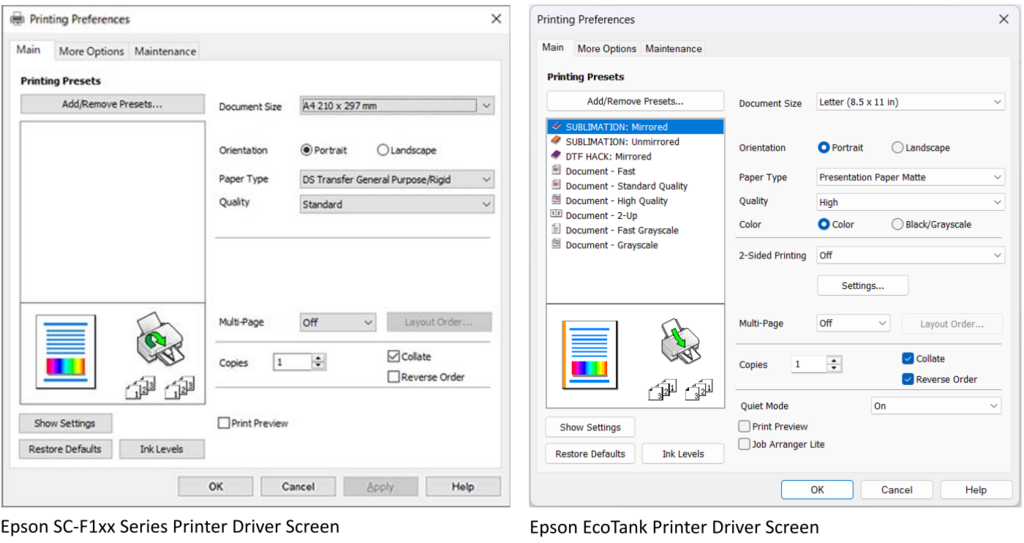
The modifications are typically in the drivers, meaning the software and instructions that run on your computer that lets you select the options on the printer, then translates the image information from your program into instructions that the printer can understand. And for the most part, the modifications are in the program where you set the settings when you go to print. For the sublimation-ready printers, any setting options that are applicable for all-purpose printers, like the variety of papers supported, are replaced with the sublimation-specific options using sublimation-specific terms. Having in the drivers can be extremely helpful for some users who want direct, clear instructions and may or may not have access to someone who can help them, whether that’s a family member or an online community or resource that can help them. Others can translate the handful of options fairly easily as there just aren’t a lot of combinations needed for sublimation, and you can save those settings using your own terminology.
Below is a side-by-side comparison of the screen shots of a sublimation-ready Epson F100 series printer (based on an EcoTank) on the left and an EcoTank driver set up for sublimation on the right. Notice that the settings on the left, the sublimation-ready printer, is a subset of what is on the right, the all-purpose EcoTank printer. The sublimation-ready printer has the same setting titless, like the Paper Type, but uses a different list of sublimation-specific terminology (they’re not even paper types because you use the same paper, but it has different uses; they should have changed the setting name, in my opinion!), while the EcoTank driver screen lists specific papers. There’s a blank area on the right that corresponds to the two-sided printing option on the EcoTanks because printing on both sides of the sublimation paper will ruin your project, but is there for the all-purpose printer. This is what I mean by “lightly modified” and “the modifications are in the drivers.”
Impact of modifications on printing
Because these are inkjet printers that take tiny amounts of water-based ink and push it through tiny nozzles, they all clog. They all use paper so they all jam. They all have color issues at various times. They all have problems at inopportune times. That is the nature of inkjet printers. Buying a sublimation-ready printer does not guarantee clog-free printing with perfect colors every time. It’s still an inkjet printer.
You know the band, Rage Against the Machine? They didn’t specify what machine they were raging against, but it was probably a printer.
Tech people everywhere
Ink delivery systems
There are two methods of printers storing and delivering ink to the printheads. The first are self-contained cartridges and the second are tanks that are filled from bottles of ink.
Cartridge printers
If you have a cartridge printer, meaning the inks come in pre-filled cartridges, the printers can tell the difference between cartridges, not the ink that’s inside it. That’s because there’s a chip on the cartridges that the printer reads that tells them about the ink in the cartridge. That chip also stores how much ink has been used. Manufacturers tend to sell their printers cheap and make money selling the ink, so they don’t want you to use cheaper “compatible” cartridges or refill the cartridge with cheaper ink, so the printer reads that chip and can expire that cartridge when it has printed a sufficient quantity (even though there’s ink still in the cartridge!). Most printers have the ability to work around this and you can purchase third-party refillable tanks for your specific model.
The sublimation-ready printers that use cartridges are Sawgrass and Brother. Sawgrass has a very aggressive chip technology that will prevent you from using compatible cartridges. You’ll need to use theirs. Brother uses a more standard technology, so the information is out there. If you can figure out which model its based off of, you can find the model number of the regular ink jet cartridges and purchase those, then find out what is needed to circumvent the chip technology. Needless to say, it’s far easier just to buy the sublimation ink cartridges specifically made for the sublimation-ready printers.
Epson WorkForce, Stylus, and other models are cartridge-based systems. You can easily purchase these refillable cartridges and fill them with sublimation ink. You cannot update the firmware on these because that’s where the instructions are to read the chips. This firmware is updated when you install it unless you specifically stop it. Because firmware updates can add patches for securing your network, I cannot recommend this option. Instead, go with the EcoTank line.
Tank printers
Not all tank printers have the piezo printhead, so just because it’s a tank printer does not mean it’s a good sublimation printer. Epson EcoTanks are the most popular because they are widely available and very inexpensive. There are other brands that will work that do have a piezo printhead (Brother), but they are more expensive.
Tank printers are filled with bottles of ink. Cartridges hold as little as 5ml (one teaspoon) of ink to 47ml. Tank printers start at around 65ml. For the EcoTanks, there are two models of ink:
- 502 ink (101 outside North America): the black ink holds 127ml while the others hold 75ml. Looking at the front of the printer, the black tank is wider than the others
- 522 ink (104 outside North America): all four colors hold 75ml of ink. Looking at the front of the printer, all four tanks are the same width
Each of these inks have “keys” on the top of the bottle. When you invert the bottle to fill the tank, each “key” will only fit the appropriate color, so you can’t put the black in the yellow tank. These keys also fit underneath some tabs on the printer which helps to stabilize the bottle. The 502 ink has four different keys than the 522 ink, preventing you from putting the 502 ink into the 522 printer and vice versa. When you order the ink, it’s important to know which tops you need. There’s also a third kind of top that doesn’t have any keys and will fit both. And there’s a fourth top, a regular screw-top bottle that comes with syringes. These are meant to fill the smaller cartridges, but you can use them to fill an EcoTank with the syringe. It’s tedious. However, if you keep the first series of bottles, you can refill them with the screw-top bottles. Why would you do that? The screw-top bottles typically hold more ink than the fancier keyed bottles, so the price per ml is lower.
There is no mess involved; the caps are designed to fit the tanks and don’t release the ink until a good seal is made with the tank, eliminating leaks. Because these printers are designed to be refillable, there is no ability for the printer itself to determine what ink is in there. However, a human can tell because the ink stains the flexible ink supply lines inside the printer whereas the Epson ink will not. If you call for support, they will ask for a picture of the inside of the printer and if they see stained lines, they know you used something other than the Genuine Epson Ink made specifically for that printer which voids your limited warranty. (More on that in a bit).
The advantage to the cartridge printers is that you just clip the ink cartridge in and go. The advantage to the tank printers is that you purchase larger quantities of substantially cheaper ink at once, fill them, and forget about it for a long time.
Back to the basic questions
Now that you have an understanding of what’s involved, let’s revisit these questions:
Do you want a sublimation-ready printer or to “convert” one?
Now that you know that a printer for sublimation is really the same printer as a regular inkjet printer using ink that is identical except for the colorant used, do you want to convert a printer or not? You may want to read my other post, Should I Convert an Ecotank Printer for Sublimation?, for more detailed information, or see the synopsis in the section about Printers that you can convert, below.
Pros for sublimation: Everything you need comes in the box, just follow the directions and you’re ready to go without modifying any settings. You have a warranty as long as you use the manufacturer’s ink.
Cons for sublimation: The cost of printers is significantly higher, ranging from $425 to $649 or more for a narrow printer and starting at $1850 to $2850 for wide format. Ink costs are also higher.
Pros for converting: The cost of printers is sustantially cheaper, starting around $179 for a narrow printer and around $550 (sometimes less) for a wide format. Ink is far, far cheaper, too. Converted printers have some of the highest resolution.
Cons for converting: You need to set 5 settings after setting it up. The warranty is voided when you put sublimation ink in it.
How big would you like to print?
A narrow format printer cannot print on a page any wider than 8.5″ or 21.5cm. Some some printers can do legal paper or 35.5cm long, while some printers can go up to 47.2″ or 120cm if you purchase roll paper and cut it to the length you want.
A wide format printer can print up to 13″ or 33cm wide. The standard cut-sheet paper is 13″x19″ or 33cm x 48.3cm (Super B). Some printers can print as long as 47.2″ or 120cm if you purchase roll paper and cut it to the length you want. Wide format printers can print all of the smaller paper sizes that a narrow format can.
Both printers have the ability to do poster printing, meaning a very large print can be made by printing it over multiple pages that can be pieced together. If you have a narrow format printer, you can print a 10″ wide print for a wind spinner by having it print over two pages, then trimming them and piecing them together for a larger print. The same can be done to get a 24″/61cm print with either a narrow printer (three pages wide) or wide printer (two pages wide).
What is your budget?
There are several budget pricepoints. If you’re just getting started, the printer is not the only thing you’ll need! You’ll need a laptop with sufficient specifications (Chromebooks, ARM/Snapdragon processors, and mobile devices don’t have the ability to use the expanded printer drivers needed for these printers), a heat press, sublimation paper, a few other accessories, and lots of blanks to press. Define your total startup budget first. Then figure out what you want to spend on a printer.
- Under $350: Your options are many models of narrow EcoTanks that you can convert.
- $400-$700: At this price point, you can purchase any narrow sublimation-ready printer or either popular model of wide-format EcoTank printers to convert.
- Over $1500: This is the price range for all wide-format, sublimation-ready printers.
Whenever you look at printers, whether for sublimation or for regular printing, always look at the cost of ink refills. Ink can be quite expensive and refills can range anywhere from $0.08/ml to $2.42/ml or more.
With the answers to those questions in mind, it’s now time to look at the various kinds of printers out there.
What models of printers are there?
I know what you’re thinking, finally, I’m getting around to answer your question! Here’s a breakdown of all the printers that are available. First I’ll talk about the sublimation-ready printers, then I’ll talk about printers you can convert along with the conversion process.
Sublimation printers
- Sawgrass SG-500 ($649 and up, narrow) and the SG-1000 ($1850+, wide) are cartridge-based printers. It comes with 4 20ml starter cartridges of ink (80ml total), design software, and a 3 year warranty. Replacement cartridges are 31ml cartridges that cost $75 each ($300 for the set), putting the cost of ink at around $2.42/ml. These printers come with a limited 2 year warranty, design software, and a print utility.
- The Brother SP-1 ($425, narrow) is also a cartridge-based printer. It comes with 4 full-size 47ml cartridges (188ml total), Artspira software, and a 2 year warranty. Replacement cartridges are $30 each ($120 for the set), putting the cost of ink at $0.69/ml. It comes with a limited 2 year warranty and the basic Artspira software. Additional features in the Artspira+ software come with a $13/month subscription.
- Epson F170 ($500, narrow) and the Epson F570 ($2850, up to 24″ wide) are tank-based printers. They come with 140ml bottles of ink, the F170 comes with one set of 4 (560ml total) and the F570 comes with 2 complete sets (1120ml total and 3 rolls of sublimation paper). Replacement bottles are $44 each ($176 for the set), setting the price of ink at $0.31/ml. They have a one-year limited warranty; the F570 warranty comes to you if you need hardware repair.
For all of the above, to install the printer, simply follow the printed instructions that come with it. No other ink or modifications are necessary. Using third-party ink voids your warranty and the Sawgrass printers will print a crosshatch over your image if using anything other than genuine Sawgrass cartridges.
Printers that you can convert
Then there’s converting an Epson printer. You can convert a cartridge printer, but, as discussed above, you need to get refillable cartridges and cannot update the firmware of the printer which I view as a security risk to your network. Instead, I recommend the EcoTank line, which is the cheapest piezo-printhead printer series that has tanks where the printer cannot determine what ink is in it.
The process to convert any EcoTank is this:
- Follow the printed directions to install the printer but use the sublimation ink you purchased separately instead of the ink that comes with it.
- Set 4 settings that change the defaults from standard quality document printing (sacrifices a bit of quality to print fast and save ink) to high quality image printing and one more setting to add Mirror Image. You would change the first four settings to print the same quality prints if you had regular ink. None of these settings are set due to the ink used, only due to the quality and whether it’s mirrored (and for acrylic, glass, or any transparent material, you turn this off).
That’s all.
If you’ve heard that there are color problems or that it needs color settings, that is outdated information. Since the EcoTanks becaome popular, manufacturers changed their formulas to work specifically with the Epson printers. No color correction settings or ICC profiles are needed anymore and if used, will cause color problems.
Ink costs about $30 or less for the four-color set of 280-400ml, putting the cost of ink at $0.08-$0.10/ml.
But there are a zillion models, which one to choose? The cheapest one. All of the models have the same printing capabilities, they differ in other document processing features like auto-duplexing, paper trays, automatic document feeds for scanning, faxing, etc — none of which are useful for sublimation. There are three features that are worth considering:
- A screen: this makes life much easier. Some, like the ET-2400, do not have a screen and errors are signaled by which lights flash. A screen is well worth it.
- Borderless letter-size printing: whether it can cover the entire 8.5″x11″ page or if it needs a margin of .1″ giving you an effective image size of 8.3″x10.8″. Personally, I’ve never needed the extra .2″ and in fact, I use the margin to cut off the margins becaue the edges can pick up black ink and deposit it on your blanks and it can’t be removed. The ET-2800/ET-2803 is typically the cheapest model that does not do borderless letter, while the ET-2850 and the newer ET-298x are typically the cheapest models that does borderless letter.
- Wide printing: 13″ wide printing is done with either the ET-15000 or the six-color ET-8550. For most sublimation printing, they will print identically. On the 8550, only one of the two black inks are used (and are filled with identical black ink) and the gray is used primarily for photographs and rarely for brightly colored images. Get whichever is cheaper, unless you’re doing primarily photographs.
If there are cheaper models because of special sales or you can find a certified ReNew at Epson’s site (fully new ink delivery systems, so there’s no residual ink in them), get them! Any money you save on the printer can be used for blanks.
The manufacturer’s warranty is voided when you put in ink other than the ink that was designed for the printer. You can get a third-party warranty for $60 or less that can cover you for up to 5 years, depending on the retailer and price you’re willing to pay and typically they don’t care what ink is in them. However, I’ve been programming and working with printers for over 40 years and I’ve never used a warranty. Oh, I’ve had problems, but they are either expressly excluded from the limited warranty or happen outside the warranty period.
More questions, with answers
So which ones clog? All of them. Which ones jam or have problems? All of them. They all have problems. You’ll see A LOT of people having problems with Epsons because they are SO popular. Same with Hiipoo ink, because it’s the one recommended by Jennifer Maker and other crafting influencers. I don’t know what the actual ratio is, but if you have 50 people using converted Epsons (30 of them using Hiipoo ink) and 10 people using sublimation-ready printers of all three brands, you’ll see a lot more converted Epson problems and most of them will be from Hiipoo ink! Also, you see only problems posted. You don’t see the people, like me, who have 6 and 3 year old EcoTanks posting, “Yeah, it took 5 years before I had a problem with mine!”
Which one should you buy? I can’t tell you that. If you’ve read this far, you probably know which one you want. If you don’t, flip a coin. You’ll know which one you want before the coin hits the table. All of them are solid printers and you’ll probably be happy with any one of them.