
Do you want to purchase a sublimation printer but don’t know where to start? Have you been looking for a while and are overwhelmed by the options? Are you in analysis paralysis when it comes to making a choice? It seems like there are SO many complicated options to find the sublimation printer that’s best for you. There really aren’t that many printers — it just seems like it! I hope this article can simplify the options for you.
In order to pick out the perfect printer for you, you’ll need to ask yourself some basic questions. But in order to properly answer them, you probably need to know a little more about what a sublimation printer does and what features are available, because my bet is that you will answer most of them, “uh, I don’t know!”
I’ll ask pose the basic questions first, then explain about sublimation printers, then come back to the questions again. Finally, I’ll get to the information you really want: the information about printer models. You can skip there if you want, but there is information about specific models in the explanation about the printers.
The Basic Questions
Given all the options you’re reading about elsewhere, it’s surprising that you really only need to answer three questions, and those will narrow the choice down for you to probably just one or two printers.
- Do you want a sublimation-ready printer or to “convert” one?
Coverting a printer means using sublimation ink purchased separately and set five settings on the printer, versus purchasing a sublimation-ready printer where you don’t have to purchase ink separately or change any settings. See my post, Should I Convert an Ecotank Printer for Sublimation?, for detailed information on what it means to “convert” a printer. - How big would you like to print: letter/legal/A4, meaning a narrow format printer, or up to 13″x19″/Super B, meaning wide format?
- What is your budget?
Before you can answer those questions, you may need an understanding of what sublimation printer are and what options are available. Let’s start with the basics.
The Basics of Sublimation Printers
First, sublimation printers are simply printers, just like the printers you use at work and at home but filled with an ink that has a different, special colorant. Let me say that again:
Sublimation printers are just printers with a slightly different ink.
There’s nothing special or magical about the printer itself, it’s simply an inkjet printer with ink that has a colorant that reacts to heat to bond with polyester fabric or specially coated items. That’s all it is. It works just like any other printer out there. In fact, there are no models of consumer sublimation printers that aren’t a twin to an already-existing inkjet model in that manufacturer’s product line. It’s simply an inkjet printer with slightly different ink.
So, what makes up a printer? Inside the plastic housing are several kinds of systems that work together.
- The printhead is what does the work of putting ink on the paper: it is fed ink from the storage system and puts it onto the paper. It does this by forcing tiny amounts of ink through very tiny nozzles.
- The ink itself.
- The printer driver is the software that is used on your device that gives the instructions to the printer. It contains settings to tell the printer what kind of quality you’d like (lower, draft quality that prints faster or high quality that prints slower), then does the translation from what your program has created into instructions that the printer can follow.
- The ink storage and delivery system determines how much ink is stored in the printer and how you get it. There are two main methods for inkjet printers: cartridges full of ink that can either be single use or a third-party refillable system, or high capacity tanks that are designed to be refillable from bottles of ink. Included in both systems is a waste ink collector (also called waste pads, maintenance boxes, or waste tanks, depending on your brand or model) for excess ink that is generated during printing and cleanings.
- The paper handling system is where the paper is stored and the precision motors, gears, and rollers that move the paper through the printer. This is the part that feeds the paper through the printer. This is pretty much the same in any printer, whether it’s an inkjet printer, a laser printer, or even an old dot-matrix or daisy wheel printer.
Let’s look at at a few aspects of these systems as they relate to sublimation printing.
● The Printhead
The printhead is the part that moves back and forth across the paper to apply the ink to the paper. There are hundreds of tiny nozzles that are about 10 micrometers in width (about 10 of those nozzles make up the width of a human hair) that apply as little as 3 picolitres of ink (one drop of water equals 50,000,000 picolitres). Looking at the printhead, your eye sees a dark strip, about an inch long and maybe about .2″ wide. The nozzles are so small, your eye cannot detect individual nozzles.
For inkjet printing, there are two main technologies that printheads use to expel the ink: piezo and thermal. All printers capable of sublimation are inkjet printers that use a piezo printhead. Why is that important? Piezo printheads use electricity to expel the ink. The technology creates an electrical charge to eject tiny amounts of ink. Contrast this to thermal printing technology that uses heat to boil and expel the ink. While this works great for regular inkjet printing, the process of heating it activates the dyes in sublimation ink, so the resulting print is useless. That’s why you can’t use just any inkjet printer. The piezo printhead technology doesn’t activate the sublimation ink, so printers that use piezo printheads are suitable for sublimation ink. Epson, Brother, and Ricoh use piezo printheads. Canon, HP, and others use thermal printing which cannot be used for sublimation ink.
● Ink
Inkjet ink for piezo printers is made from a colorless ink base that is typically water, glycerol, and propylene glycol, plus the colorant. Colorants can be pigments or aqueous (water-based) dyes, depending on the printer. A printer can use both pigment or dye based ink even in the same printer (Epson EcoTanks that take 502 ink use a black pigment ink while the other three colors are dye ink). The colorant is 5% or less of the ink volume. The colorants don’t typically change the viscosity (thickness) of the inks as they have the same viscosity as plain water.
Sublimation ink isn’t really all that different than inkjet ink. The only difference is the colorant used, in this case different aqueous dyes that react with heat to bond with polyester coatings. It’s still 5% colorant, 95% the exact same ink base. There’s no difference between the sublimation ink in terms of viscosity or chemistry that makes a difference in how it goes through the nozzles. The printheads cannot tell the difference between sublimation ink or regular ink. (There is technology that uses chips on cartridges so you can’t refill them or use cheaper, third-party ink; the printer reads the chip which prevents or allows use of the ink in the cartridge. There aren’t sensors in the printer that can tell what kind of ink is used in tank printers.)
● Printer Modifications for Sublimation (Drivers)
Because the piezo printers can use either ink, there’s not really a low cost printer (meaning under $10,000) with a printhead designed specifically for sublimation printing. All sublimation-ready printers that are available are lightly modified versions of another regular inkjet printer in their lineup. The physical modification can include a slightly lower resolution printhead and any labels indicating the model number and ink recommendations.
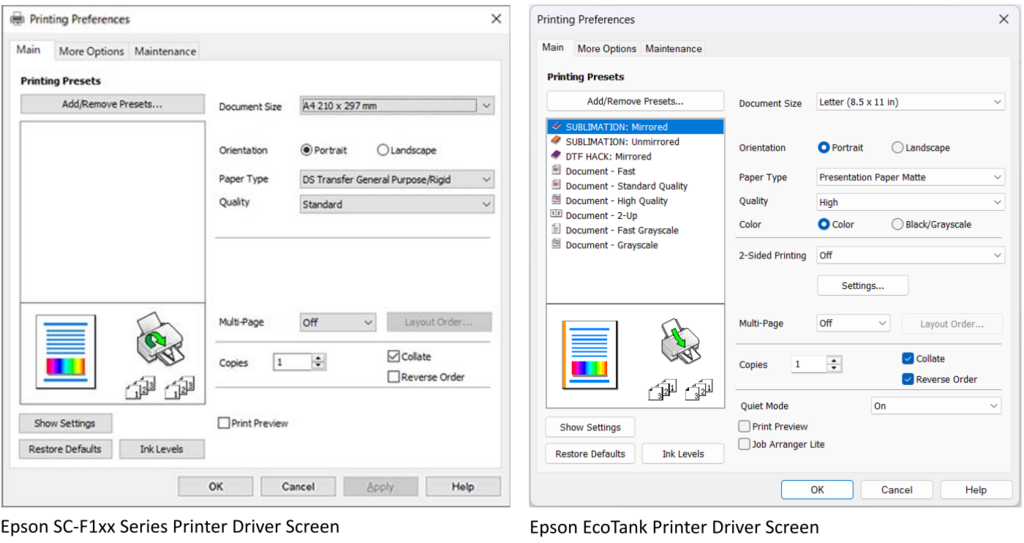
The modifications are typically in the drivers, meaning the software and instructions that run on your computer that lets you select the options on the printer, then translates the image information from your program into instructions that the printer can understand. And for the most part, the modifications are in the program where you set the settings when you go to print. For the sublimation-ready printers, any setting options that are applicable for all-purpose printers, like the variety of papers supported, are replaced with the sublimation-specific options using sublimation-specific terms. Having in the drivers can be extremely helpful for some users who want direct, clear instructions and may or may not have access to someone who can help them, whether that’s a family member or an online community or resource that can help them. Others can translate the handful of options fairly easily as there just aren’t a lot of combinations needed for sublimation, and you can save those settings using your own terminology.
Below is a side-by-side comparison of the screen shots of a sublimation-ready Epson F100 series printer (based on an EcoTank) on the left and an EcoTank driver set up for sublimation on the right. Notice that the settings on the left, the sublimation-ready printer, is a subset of what is on the right, the all-purpose EcoTank printer. The sublimation-ready printer has the same setting titles, like the Paper Type, but uses a different list of sublimation-specific terminology (they’re not even paper types because you use the same paper, but it has different uses; they should have changed the setting name, in my opinion!), while the EcoTank driver screen lists specific papers. There’s a blank area on the right that corresponds to the two-sided printing option on the EcoTanks because printing on both sides of the sublimation paper will ruin your project, but is there for the all-purpose printer. This is what I mean by “lightly modified” and “the modifications are in the drivers.”
● Ink delivery systems
There are two methods of printers storing and delivering ink to the printheads. The first are self-contained, pre-filled cartridges and the second are tanks that are filled from bottles of ink.
○ Cartridge Printers
A cartridge printer that stores the ink in pre-filled cartridges, usually costing about $35-$85 per color. The ink is contained inside and as each color is used up, you purchase another cartridge to replace it. These cartridges ride on top of the printhead and deliver the ink directly into the printhead. Each cartridge has a chip on it that the printer reads that tells them about the ink in the cartridge, such as who manufactured the ink, what color the ink is (so you don’t contaminate your colors), and it stores how much ink has been used. Manufacturers tend to sell their printers cheap and make money selling the ink, so they don’t want you to use cheaper “compatible” cartridges or refill the cartridge with cheaper ink, so the printer reads that chip and can expire that cartridge when it has printed a sufficient quantity (even though there’s ink still in the cartridge!). Most printers have the ability to work around this and you can purchase third-party refillable tanks for your specific model. Printers look only at the chips on the cartridge and they have no sensors to figure out if the ink is suitable or not.
The sublimation-ready printers that use cartridges are Sawgrass and Brother. Sawgrass has a very aggressive chip technology that will prevent you from using compatible cartridges. You’ll need to purchase only genuine Sawgrass cartridges. Brother uses a more standard technology, so the information is out there on how to use refillable cartridges. Figure out which model the SP-1 is based off of, then purchase the reusable cartridges for that printer. You’ll also need to find out what is needed to circumvent the chip technology. Needless to say, it’s far easier just to buy the sublimation ink cartridges specifically made for the sublimation-ready printers.
Epson WorkForce, Stylus, and other models are cartridge-based systems. You can easily purchase these refillable cartridges and fill them with sublimation ink. You cannot update the firmware on Epson cartridge printers because the updated firmware provides the instructions to read the chips. This firmware is updated when you install it unless you specifically stop it. Because firmware updates can add patches for securing your network, I cannot recommend this option. Instead, go with the EcoTank line.
○ Tank Printers
Not all tank printers have the piezo printhead, so just because it’s a tank printer does not mean it will work as a sublimation printer (Canon Megatanks and HP Smart Tanks have thermal printheads that will not work). Epson EcoTanks are the most popular for sublimation, and also for regular printing, because they are widely available and very inexpensive. There are other brands that will work that do have a piezo printhead (Brother), but they are more expensive and you don’t get any better quality or additional features that are useful for sublimation for the extra money.
Tank printers are filled with bottles of ink. Cartridges hold as little as 5ml (one teaspoon) to 47ml of ink. You may have one of those regular inkjet printers that uses tiny cartridges that hold 5ml of ink in total for all three colors, so you’re used to buying expensive cartridges quite often. The capacity of tank printers used for sublimation starts at around 65ml, which is the equivalent of over 30 of those tiny cartridges! The ink lasts for years for a hobbyist!
For the Epson SureColor F-x70 sublimation-ready printers, purchase Epson T49M ink or you void the warranty that you paid a premium for (which includes lifetime phone support). If the ink is sold at a discount from the usual $25 list price for 140ml, be sure you are buying genuine Epson ink on sale, not a third-party selling cheaper ink. (It’ll work just fine, but why ruin your ability to call for help just to save $50?)
When buying sublimation ink for the EcoTank models, the ink in the bottles is exactly the same for all EcoTanks. They list printer model numbers because of the unique “keys” or wings on the tops of the bottles. Each of these inks have “keys” on the top of the bottle. When you invert the bottle to fill the tank, each “key” will only fit the appropriate color, so you can’t put the black in the yellow tank. These keys also fit underneath some tabs on the printer which helps to stabilize the bottle. The 502 ink has four different keys than the 522 ink, preventing you from putting the 502 ink into the 522 printer and vice versa. The 552 and T49M also are different and not compatible with the other printers. When you order your sublimation ink, it’s important to know which tops you need.
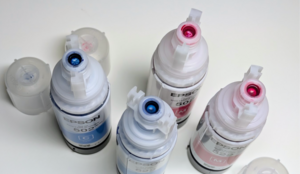
New EcoTank models come out regularly, and ink manufacturers don’t always quickly update their list of compatible printers. The ink is identical, it’s only the bottles that differ!
- 502 ink (101 outside North America): the black ink holds 127ml while the others hold 75ml. Looking at the front of the printer, the black tank is wider than the others. If you can’t find your model number, look for ET-15000, which uses the same model.
- 522 ink (104 outside North America): all four colors hold 75ml of ink. Looking at the front of the printer, all four tanks are the same width. If you can’t find your model number, look for ET-2800 that uses the same ink.
- 552 ink: six colors for the ET-85xx photographic printers. There’s not much confusion with the other two, as this has six inks, not four. You must fill all six tanks with the proper colors.
- Universal bottles have no wings on them, just the round inner part. They work just fine to fill the printer. You’ll know you’re purchasing universal ink if it is for both the ET-2800 and the ET-15000.
- If syringes are shown, this is ink that doesn’t have special tops for the EcoTanks and you’ll use the syringes to insert the ink which is useful for cartridge printers, but tedious for EcoTanks. This ink is usually the cheapest per ml, so when you fill your printer initially with one of the above methods, save the bottles (labeling which is for what color!), then buy this cheaper ink to refill those bottles.
Filling the tanks is mess-free with universal or the appropriately-keyed caps. The caps are designed to fit the tanks and don’t release the ink until a good seal is made with the tank, eliminating leaks and stop the flow of ink before the tank can overflow.
Because these printers are designed to be refillable, there is no ability for the printer itself to determine what ink is in there. However, a human can tell because ink other than genuine Epson ink stains the flexible ink supply lines inside the printer. If you call for support, they will ask for a picture of the inside of the printer and if they see stained lines, they know you used something other than the Genuine Epson Ink made specifically for that printer which voids your limited warranty. (More on that in a bit).
In summary, the advantage to the cartridge printers is that you just clip the ink cartridge in and go. The advantage to the tank printers is that you purchase larger quantities of substantially cheaper ink at once, fill them, and forget about it for a long time.
Impact of Modifications on Printing
Because these are inkjet printers that take tiny amounts of water-based ink and push it through tiny nozzles, they all clog. They all use paper so they all jam. They all have color issues at various times — and color issues can be due to many variables other than the printer and ink. All inkjet printers have problems at inopportune times. That is the nature of inkjet printers. Buying a sublimation-ready printer does not guarantee clog-free printing with perfect colors every time. It’s still an inkjet printer.
You know the band, Rage Against the Machine? They didn’t specify what machine they were raging against, but it was probably a printer.
Tech people everywhere
Back to the Basic Questions
Now that you have an understanding of what’s involved, let’s revisit these questions:
● Do you want a sublimation-ready printer or to “convert” one?
Now that you know that a printer for sublimation is really the same printer as a regular inkjet printer using ink that is identical except for the colorant used, do you want to convert a printer or not? You may want to read my other post, Should I Convert an Ecotank Printer for Sublimation?, for more detailed information, or see the synopsis in the section about Printers that you can convert, below.
Pros for sublimation-ready printers: Everything you need comes in the box, just follow the directions and you’re ready to go without modifying any settings. You have a warranty as long as you use the manufacturer’s ink.
Cons for sublimation-ready printers: The cost of printers is significantly higher, ranging from $425 to $649 or more for a narrow printer and starting at $1000 to $3099 for wide format. Ink costs are also higher. They don’t come with a scanner, either.
Pros for converting: The cost of printers is substantially cheaper, starting around $179 for a narrow printer and around $550 (sometimes less) for a wide format. Ink is far, far cheaper, too. Converted printers have some of the highest resolution printheads. You also get a scanner that can be used regardless of what ink is in it.
Cons for converting: You need to set 5 settings after setting it up. The limited-warranty is voided when you put sublimation ink in it.
● How big would you like to print?
A narrow format printer cannot print on a page any wider than 8.5″ or 21.5cm. Some some printers can do legal paper or 35.5cm long, while some printers can go up to 47.2″ or 120cm if you purchase roll paper and cut it to the length you want.
A wide format printer can print up to 13″ or 33cm wide, with one extra-wide printer going to 24.4″ wide with rolls of sublimation paper. The standard cut-sheet paper is 13″x19″ or 33cm x 48.3cm (Super B). Some printers can print as long as 47.2″ or 120cm if you purchase roll paper and cut it to the length you want (that extra-wide one can support much, much longer depending on your operating system, software, and driver configuration). Wide format printers can print all of the smaller paper sizes that a narrow format can.
Both narrow and wide printers have the ability to do poster printing, meaning a very large image can be made by printing it over multiple pages that can be pieced together. If you have a narrow format printer, you can print a 10″ wide print for a wind spinner by having it print over two pages, then trimming them and piecing them together for a larger print. The same can be done to get a 24″/61cm print with either a narrow printer (three pages wide) or wide printer (two pages wide).
● What is your budget?
There are several budget price points. If you’re just getting started, the printer is not the only thing you’ll need! You’ll need a laptop with sufficient specifications (inexpensive Chromebooks, ARM/Snapdragon processors, and mobile devices like phones and tablets don’t have the ability to use the expanded printer drivers needed for these printers), a heat press, sublimation paper, a few other accessories, and lots of blanks to press. Define your total startup budget first. Then figure out what you want to spend on a printer.
- Under $350: Your options are many models of narrow EcoTanks that you can convert.
- $400-$700: At this price point, you can purchase any narrow sublimation-ready printer or either popular model of wide-format EcoTank printers to convert.
- Over $1000: This is the price range for all wide-format, sublimation-ready printers.
Whenever you look at printers, whether for sublimation or for regular printing, always look at the cost of ink refills. Ink can be quite expensive and refills can range anywhere from $0.08/ml to $2.74/ml or more. While it varies widely, a good average amount of ink for a letter-size print is about 0.3ml. That makes a print anywhere from less than $0.03 to $0.82 per print. That’s a huge difference, especially if you want to sell. With markup about 3x your costs, the ink can add anywhere from $0.08 to $2.50 to the final price of your product.
With the answers to those questions in mind, it’s now time to look at the various kinds of printers out there.
What are the Printer Choices?
I know what you’re thinking: finally, I’m getting around to answer your question! Here’s a breakdown of all the printers that are available. First I’ll talk about the sublimation-ready printers, then I’ll talk about printers you can convert along with the conversion process.
Sublimation-Ready printers
- Sawgrass SG-500 ($660 and up, narrow) and the SG-1000 ($1699+, wide) are cartridge-based printers. It comes with 4 31ml cartridges of ink (124ml total), design software, and a 3 year warranty. Replacement cartridges are 31ml cartridges that cost $85 each ($340 when purchased as a set of 4), putting the cost of ink at around $2.74/ml. These printers come with a limited 2 year warranty, design software, and a print utility. The prices are based on the Sublijet ink, which is standard sublimation ink. They also offer a Versaflex system which also works on cotton; printers cost around $100 more and inks cost $5 more per cartridge. Versaflex inks are not interchangeable with Sublijet inks and must be used in the matching printer.
- The Brother SP-1 ($425, narrow) is also a cartridge-based printer. It comes with 4 full-size 47ml cartridges (188ml total), Artspira software, and a 2 year warranty. Replacement cartridges are $35 each ($140 for the set), putting the cost of ink at $0.74/ml. It comes with a limited 2 year warranty and the basic Artspira software. Additional features in the Artspira+ software come with a $13/month subscription.
- Epson F170 ($399, narrow), the Epson F370* ($999, wide), the Epson F570 ($2495, extra wide, up to 24″ wide), and the Epson F570 Pro ($3099, extra wide, up to 24″, with extra supplies and software) are tank-based printers. They come with one set of four 140ml bottles (560ml total) and the F570 Pro comes with 2 complete sets (1120ml total and 3 rolls of sublimation paper plus software). Replacement bottles are $25 each ($100 for the set), setting the price of ink at $0.18/ml. They have a one-year limited warranty; the F570 and F570 Pro warranties have next (business) day, onsite repair. (*Available in November, 2026)
For all of the above, to install the printer, simply follow the printed instructions that come with it. No other ink or modifications are necessary. Using third-party ink voids your warranty and the Sawgrass printers will print a crosshatch over your image if using anything other than genuine Sawgrass cartridges.
Prices checked on 10/4/2026 on the manufacturer’s websites. The price of Epson T49M sublimation ink has actually dropped by half since early 2026. It had been about $45 per bottle and now retails for $25. The price of the F170 has also dropped a bit and there are now two options for the F570, one without the extra ink, paper, and software.
Printers That Can Be Converted
In the Basics of Sublimation Printers section, it was noted that not all printheads are capable of printing sublimation ink and that not all tank printers have the proper printhead. Thermal printheads, like those used by HP, Canon, and others, heat the ink to expel it and prematurely activate the sublimation dye, rendering it useless. Piezo printheads do not heat the ink, so these can be used for sublimation. Brands that use piezo printheads are Epson, Brother, and Ricoh (who makes the Sawgrass printers). While Brother and Ricoh are fine printers, they are typically marketed to businesses and are more expensive than the very popular Epson printers, particularly the EcoTank line. While you can convert any printer with a piezo printhead, unless you’ve got one lying around or are being given one, the extra cost doesn’t get you any better printing. Because of their low cost and ease of use, Epson EcoTanks are the most popular printer to use, both for sublimation and for regular home printing.
You can convert an Epson cartridge printer (like the WorkForce printers), but, as discussed above, you need to get refillable cartridges and cannot update the firmware of the printer which I view as an extreme security risk to your network. Instead, I recommend the EcoTank line, which is the cheapest piezo-printhead printer series that has tanks where the printer cannot determine what ink is in it, therefor you can and should update the firmware, drivers, and utilities to minimize the risk to your network. Plus, EcoTanks hold 70ml or more of ink in their tanks while the cartridge printers hold as little as 15ml, meaning you’ll refill the cartridges sooner. Refilling the cartridges must be done with syringes, meaning you’ll open the bottle of ink and draw the ink into the syringe, leaving the bottle open for spills (and I can tell you from first-hand experience that you cannot get a half bottle of cyan ink out of ivory carpeting). If you’re buying new, EcoTanks are far easier to fill, maintain, get help for, and aren’t a security risk to your network.
The process to convert any EcoTank is this:
- Follow the printed directions to install the printer but use the sublimation ink you purchased separately instead of the ink that comes with it.
- Set 4 settings that change the defaults from standard quality document printing (sacrifices a bit of quality to print fast and save ink) to high quality image printing and one more setting to add Mirror Image. You would change the first four settings to print the same quality prints if you had regular ink. None of these settings are set due to the ink used, only due to the quality and whether it’s mirrored (and for acrylic, glass, or any transparent material, you turn this off).
That’s all.
If you’ve heard that there are color problems or that it needs color settings, that is outdated information. Since the EcoTanks became popular, manufacturers changed their formulas to work specifically with the Epson printers. No color correction settings or ICC profiles are needed anymore and if used, will cause color problems.
Ink costs about $30 or less for the four-color set of 280-400ml, putting the cost of ink at $0.08-$0.10/ml. Cost per ml is based on $30 as the cost for the set of ink and they are usually on sale for far less, putting the cost of ink as low as $0.04/ml.
But there are a zillion models, which one to choose? The cheapest one. Seriously. All of the models have the same printing capabilities, they mostly differ in other document processing features like auto-duplexing, paper trays, automatic document feeds for scanning, faxing, etc — none of which are useful for sublimation. There are three features that are worth considering:
- A screen: this makes life much easier. Some, like the ET-2400, do not have a screen and errors are signaled by which lights flash. A screen is well worth it.
- Borderless letter-size printing: whether it can cover the entire 8.5″x11″ page or if it needs a margin of .1″ giving you an effective image size of 8.3″x10.8″. Personally, I’ve never needed the extra .2″ and in fact, I use the margin to cut off the margins becaue the edges can pick up black ink and deposit it on your blanks and it can’t be removed once it’s pressed on your project. The ET-2800/ET-2803 and some ET-29xx models are typically the cheapest model that does not do borderless letter, while the ET-2850 and the newer ET-298x are typically the cheapest models that does borderless letter.
- Wide printing: 13″ wide printing is done with either the ET-15000 or the six-color ET-8550. For most sublimation printing, they will print identically. On the 8550, only one of the two black inks are used (and are filled with identical black ink) depending on the paper selected and the gray is used primarily for photographs and rarely for brightly colored images, so the extra inks are rarely used, so it’ll print just like the ET-15000. Get whichever is cheaper, unless you’re doing primarily photographs.
If there are cheaper models because of special sales or you can find a certified ReNew at Epson’s site (fully new ink delivery systems, so there’s no residual ink in them), get them! Any money you save on the printer can be used for blanks.
The manufacturer’s warranty is voided when you put in ink other than the ink that was designed for the printer (that’s true for sublimation-ready printers, too). You can get a third-party warranty for $60 or less that can cover you for up to 5 years, depending on the retailer and price you’re willing to pay and typically they don’t care what ink is in them. However, I’ve been programming and working with printers for over 40 years and I’ve never used a warranty. Oh, I’ve had problems, but they are either expressly excluded from the limited warranty or happen outside the warranty period.
More Questions, With Answers
So which ones clog? All of them. Which ones jam or have problems? All of them. They all have problems. If you look at groups for sublimation support, you’ll see a lot of people having problems with Epsons because they are SO popular. Same with Hiipoo ink, because it’s the one recommended by many crafting influencers. I don’t know what the actual ratio is, but if you have 50 people using converted Epsons (30 of them using Hiipoo ink) and 10 people using sublimation-ready printers of all three brands, you’ll see a lot more converted Epson problems and most of them will be from Hiipoo ink! Also, be aware that you see only problems posted. You don’t see the people, like me, who have 6 and 3 year old EcoTanks posting, “Yeah, it took 5 years before I had a problem with mine!”
What about self-maintenance? All inkjet printers discussed here have self-maintenance. What self-maintenance does is run a mini-clean periodically, pretty much the same kind of cleaning that you would initiate to fix a problem, but it uses far less ink. The cleaning routine goes something like this: shake the printhead to loosen any small air bubbles and break up any ink starting to clot, run a plastic scraper over the exterior of the printhead to remove any drying and dried ink along with any microscopic debris that’s stuck to it, then use a pump to pull a little bit of each color ink through the each of the many nozzles to use as a cleaning solution which is then put in the waste ink collector. These mini-cleans use tiny amounts of ink, whereas the cleanings you initiate can use much more ink as a cleaning solution. All Epson printers (both converted and sublimation-ready) run their self-maintenance when powered on. Sawgrass is different and runs it every 10 hours when plugged in and turned on. I’ve talked to Sawgrass owners who left the printer on and it ran out of ink after about a year, despite printing less than 20 prints (it costs $330 or more to replace the ink!). For the Brother and Epson, every time you turn it on, it runs a mini-clean, so there’s waste ink generated that can fill your collector box. Leave it turned on and the capping station will cover the printhead much like a cap on a felt-tip marker so it doesn’t need to run a cleaning every time you turn it on, especially if you use it very frequently. As far as printing every week, that’s more suitable to thermal printers, not piezo printers; what causes EcoTanks to clog an entire color is air in the ink supply and that air is quickly and easily removed with a syringe but isn’t prevented by frequent printing.
Which one should you buy? I can’t tell you that. If you’ve read this far, you probably know which one you want. If you don’t, flip a coin. You’ll know which one you want before the coin hits the table. All of them are solid printers and you’ll probably be happy with any one of them. Still need the information presented a little differently? I don’t blame you. This is an expensive purchase and you want to get it right.
I started this post with three questions that you should ask yourself, and I said that you probably would answer “I don’t know” at the beginning. Hopefully you can answer these questions armed with a lot more information. These questions help you decide what’s right for you. It’s summarized in the table below.
- Do you want a sublimation-ready printer or to “convert” one? In the chart below, Converted printers are on the left in blue text, sublimation-ready printers are on the right in the red text.
If you still need more information, see my post, Should I Convert an Ecotank Printer for Sublimation?, for more information. - How big would you like to print: letter/legal/A4, meaning a narrow format printer, or up to 13″x19″/Super B, meaning wide format? Or up to 24.4″ wide? Narrow printers are at the top and in regular text, wide printers are below those in bold text, and the extra-wide printers are at the bottom in bold and italics.
- What is your budget? The cost of the printers is in the middle column in order from least to most expensive for the purchase price. Don’t forget you’ll still need a heat press, maybe a computer, paper and other supplies, and a lot of blanks to sublimate, so be sure your budget can cover all of this.
| Convert an EcoTank An | Cost | Sublimation-Ready |
|---|---|---|
| EcoTank (Tank, Narrow) 2800/2803, 2850, 29xx | $179-$220 +$30 ink | |
| $399 | Epson F170 (Tank, Narrow) | |
| $425 | Brother SP-1 (Cartridge, Narrow) | |
| EcoTank (Tank, Wide) 15000 or 8550 | $550 +$30 ink | |
| $660+ | Sawgrass SG-500 (Cartridge, Narrow) | |
| $999 | Epson F370 (Tank, Wide) | |
| $1699+ | Sawgrass SG-1000 (Cartridge, Wide) | |
| $2450 | Epson F570 SE (Tank, Extra-Wide) | |
| $3099 | Epson F570 Pro (Tank, Extra-Wide) |
The above table shows the cost to purchase the printer. That’s not the only cost. The more expensive printers can be cheaper due to the cost of ink in the long run, particularly if you are selling your products. Let’s look at what the cost to own is after printing a lot of pages. (We don’t have to include paper and other supplies because you’ll use those at the same rate regardless of which printer you choose.)
First, let’s define a page. Ink is used relatively consistently between printers. The industry standard is 1ml of ink per square foot at 100% coverage (meaning 100% of the paper is covered at the maximum ink density). A letter-size page is about 0.64 square feet. Few images cover the entire page at the maximum ink density as there is generally white space and it contains lighter colors that use a lot less ink. Let’s go with 50% coverage, so about 0.3ml per letter-size page. Your mileage can and will vary, but this is a good ballpark number that seems to be about right in my experience.
Let’s look at what it will cost to purchase more ink to print 2500 letter-size pages, which at 0.3ml per page, that works out to needing a total of 750ml of ink. For wide printers that print larger pages, that’s equates to 1250 11″x17″ pages requiring 0.6ml per page, or about 940 13″x19″ prints at 0.8mḷ per page. Again, these are rough estimates and your mileage can and will vary based on the colors and white space in each of the images you print. Purchasing more ink to total 750ml, the total costs are shown in the chart, below.
| Printer | Purchase Cost | Initial Ink & Refill Capacity | # Refills for 750ml | $ per Refill | Additional Ink Cost | Total Cost for Printer + Ink | ||
|---|---|---|---|---|---|---|---|---|
| Narrow Printers | ||||||||
| EcoTank 2800 or similar | $209 | 400ml | 1 | x | $30 | = | $30 | $239 |
| Epson F170 | $399 | 560ml | 1 | x | $100 | = | $100 | $499 |
| Brother SP-1 | $445 | 188ml | 3 | x | $140 | = | $420 | $865 |
| Sawgrass SG-500 | $660+ | 124ml | 5 | x | $340 | = | $1700 | $2360+ |
| Wide Printers | ||||||||
| Epson 15000 or similar | $550 | 400ml | 1 | x | $30 | = | $30 | $580 |
| Epson F370 | $999 | 560ml | 1 | x | $100 | = | $100 | $1099 |
| Sawgrass SG-1000 | $1699+ | 124ml | 5 | x | $340 | = | $1700 | $3399+ |
| Extra-Wide Printers | ||||||||
| Epson F570 SE | $2450 | 560ml | 1 | x | $100 | = | $100 | $2550 |
| Epson F570 Pro | $3099 | 1120ml | 0 | x | $100 | = | $0 | $3099 |
As you can see, the cost of ink can make a huge difference in the cost to own, especially if you are printing a lot. If you have a business and print 25 pages per week (you have to count the misprints and purge pages, too), you could spend the total amount in the far right column in about 2 years. Be sure your budget accounts for the cost of ink. Some people are quite surprised at the cost of ink and end up needing to find an affordable alternative.
Summary
I realize this is a very long and very detailed writeup. As someone who has been programming and working with printers for over 40 years, these are the many details I consider when purchasing a printer (not just sublimation printers). You don’t have to know the difference between thermal and piezo printers, or whether it takes 0.3ml or 0.6ml of ink to cover a page, but if you understand that not every printer can be converted due to the printhead’s technology or that some printers need a lot fewer refills than others over time, you’re well ahead of the game. I include all these details because these questions have come up on the various chat groups time and time again. The text is very detailed, the tables summarize the information. Hopefully you have a good idea of which printer is right for you.